Rich text and images
Four components from isolenui/kit/charts.h: spangroup for a paragraph of mixed runs and links, animimg for a flip book of images, imagebtn for a button drawn from images, and texture3d for an image shown at its own pixel size. ui.h already includes them. See the kit for how components link.
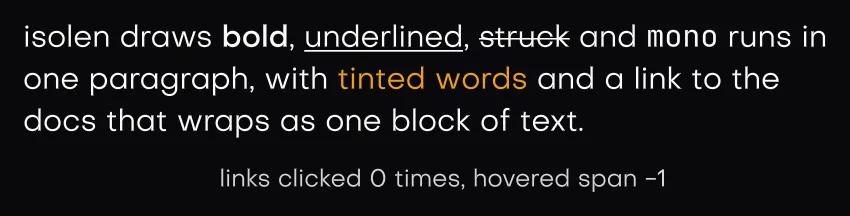
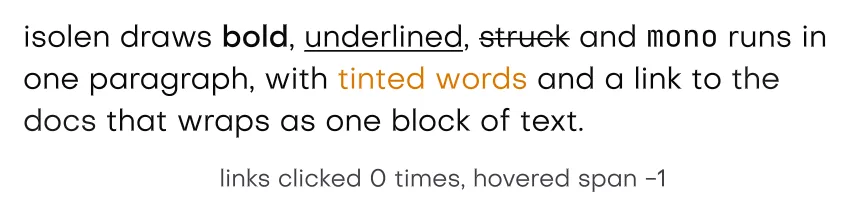
In the gallerySpan GroupspangroupAnimation Imageanimation_imageImage Buttonimage_button3D Texturetexture_3d
spangroup
spangroup lays out an array of text_span runs as one paragraph. Words wrap across span edges, a break only falls on a space or a newline, and each line takes the tallest run placed on it.
| text_span field | Meaning |
|---|---|
text, len | UTF-8 text. A zero len reads up to the terminator. |
px | Size in px. Zero takes the theme text_px. |
face | Atlas face. Zero picks from the flags: mono, bold, or the theme ui face. |
color | Ink. Zero takes the theme text colour. Links ignore it. |
flags | span_bold, span_underline, span_strike, span_link, span_mono. |
span_style_of(u) returns a left aligned span_style with everything else zero.
| span_style field | Meaning |
|---|---|
align | Left, centre or right per line. |
leading | Line pitch as a multiple of each run's size. Zero takes the theme leading, and zero there uses the font line height. |
max_lines | Lines past this are dropped. Zero means no limit. |
link | Link ink. Zero takes the theme accent. |
version | Nonzero stands in for hashing the text each frame. Change it whenever the text changes. |
The three argument form takes the full width. The paragraph measures itself like text, so a fit box sizes to it.
Links and span_hit
span_hit holds span indices for this frame, each minus one when there is none: clicked, hovered and focused. A hovered link is underlined and lightened.
A paragraph with at least one link joins the tab order. Focus lands on the first link, left and right move between links, enter clicks the focused one, and a plain tab walks the remaining links before focus moves on. A keyboard focused link gets a ring. A press anywhere but on a link does nothing.
#include "isolenui/ui/ui.h"
#include "isolenui/kit/kit.h"
static void notice(ui::ctx* u)
{
// the spans are read again in ui::end, so they live past the frame
static const ui::text_span spans[] = {
{ "Rendering moved to the ", 0u, 0.0f, 0u, 0u, 0u },
{ "cpu backend", 0u, 0.0f, 0u, 0u, ui::span_bold },
{ " for this session. See ", 0u, 0.0f, 0u, 0u, 0u },
{ "the log", 0u, 0.0f, 0u, 0u, ui::span_link },
{ " or ", 0u, 0.0f, 0u, 0u, 0u },
{ "switch back", 0u, 0.0f, 0u, 0u, ui::span_link },
{ ".", 0u, 0.0f, 0u, 0u, 0u },
};
ui::span_style st = ui::span_style_of(u);
st.max_lines = 3u;
// the text never changes, so a version skips hashing it every frame
st.version = 1u;
const ui::span_hit h = ui::spangroup(u, "notice", spans, 7u, st,
ui::col().width(lay_pct(1.0f)));
if (h.clicked == 3) {
// open the log here
} else if (h.clicked == 5) {
// switch the backend here
}
}animimg
animimg plays count images from frames at fps and returns the frame shown. repeat plays that many times and then holds the last frame, and zero loops forever. A new restart value starts it over from the first frame. paused stops the clock, reverse plays the frames backwards, and f is the fit. A zero fps plays at 1.
Its clock only runs while the image is on screen. Painting is the proof: the box only paints when it is inside its clip, and that paint asks for the next frame with redraw_after, timed to the next image. Off screen, paused or finished, it asks for nothing and an idle app stays idle. A stall over a quarter of a second counts as a quarter of a second, so a hitch does not skip ahead. See frames on demand.
imagebtn
imagebtn is a button drawn from images. imagebtn_images names one per state: released, pressed, hovered, disabled, checked, checked_pressed and checked_disabled. A state left as GFX_NONE falls back to checked for the checked states and to released for the rest.
imagebtn_spec has mid images and optional left and right caps. With a cap it becomes a three slice: the caps keep their own width, the middle stretches, and every slice fills the height. Without caps the middle is drawn with the fit f. disabled turns it off.
It returns true on a click, or enter or space while it has focus, and never while disabled. Pass a bool* as checked and each click flips it, like a toggle. Pass null for a plain button.
texture3d
texture3d shows a gfx_image at the pixel size you give, so a fit needs no device to ask. texture3d_of(tex, width, height) fills a spec with fit_contain and alpha 1. fit_cover crops through the texture coordinates. flip_y serves render targets whose rows run bottom up. A missing texture or a zero size draws an empty raised panel instead. To show a texture your own renderer draws, wrap it with gfx_image_external, or keep an image current with gfx_image_update. See assets and handles.
#include "isolenui/ui/ui.h"
#include "isolenui/kit/kit.h"
struct media {
gfx_image spinner[12];
ui::imagebtn_spec mute;
bool muted = false;
gfx_image preview;
};
static void toolbar(ui::ctx* u, media* m)
{
ui_box(u, ui::row().gap(12.0f).items(lay_align_centre))
{
// twelve frames at 24 fps, the clock stops while the box is off screen
ui::animimg_spec spin = {};
spin.frames = m->spinner;
spin.count = 12u;
spin.fps = 24.0f;
ui::animimg(u, "busy", spin, ui::row().width(32.0f).height(32.0f));
// a bool makes it a toggle, the checked images show while it is on
if (ui::imagebtn(u, "mute", m->mute, &m->muted,
ui::row().width(40.0f).height(40.0f))) {
// apply the mute here
}
// an image shown at its own pixel size inside the box
ui::texture3d_spec tex = ui::texture3d_of(m->preview, 640u, 360u);
tex.f = ui::fit_cover;
ui::texture3d(u, "preview", tex, ui::row().width(320.0f).height(180.0f));
}
}isolenui/kit/charts.h also holds gif and the anim_* runtime it plays on, see GIF and animations, and model_view for glTF models, see 3D model viewer. lottie plays Lottie files on the same runtime, see Lottie.