Colour picker
A saturation and value area, a hue strip, an alpha strip, hex and channel fields and swatches, over one packed colour. The parts are also public, for your own layouts.
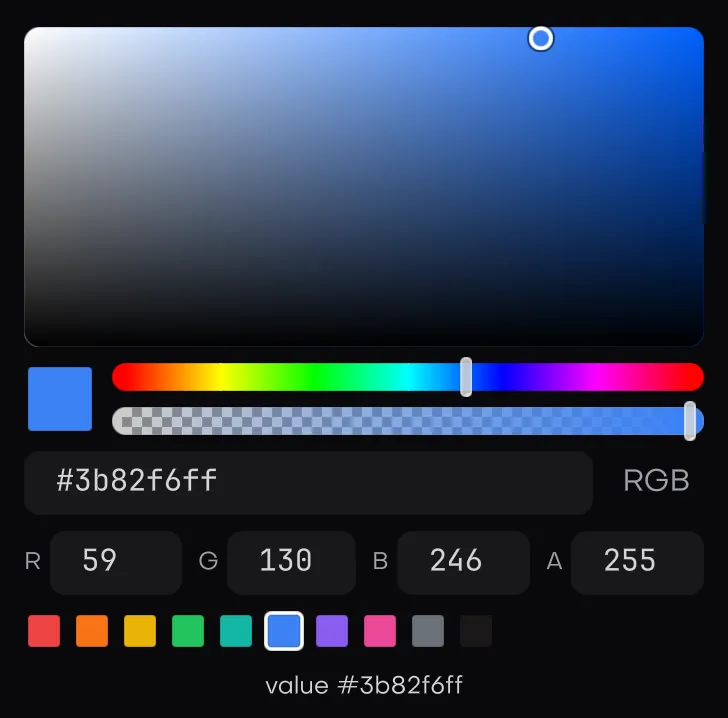
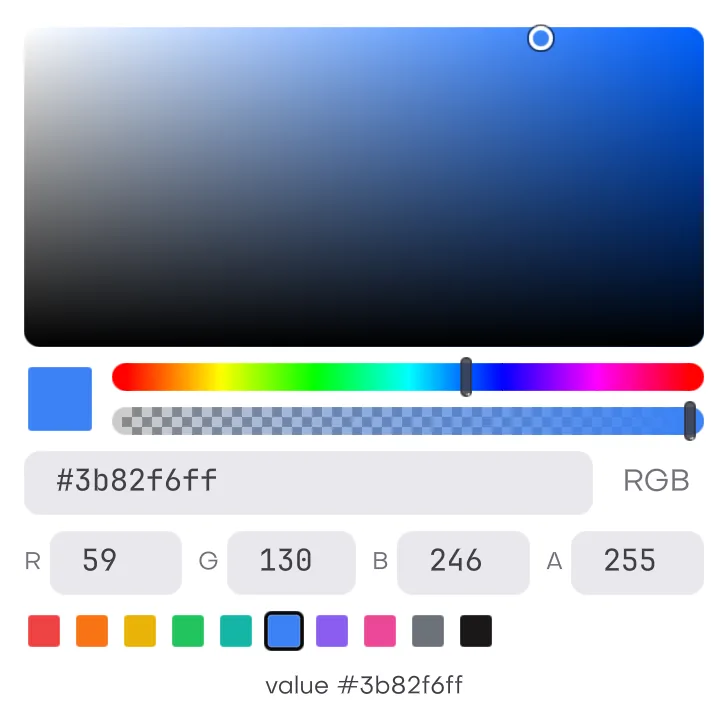
In the galleryColour Pickercolour_picker
Colours are the engine's packed uint32_t, red in the low byte and alpha in the high byte. See colors. Hex written in source, such as "#8a64e5", is checked at compile time and has its own page, colours. hex_parse below is the run time one, for text a user types. Everything here lives in isolenui/kit/pickers.h and comes in through isolenui/kit/kit.h.
Conversions
| Call | Does |
|---|---|
hsv | h, s and v, each from 0 to 1. Hue 0 is red and wraps at 1. |
hsv_of(rgba) | The hue, saturation and value of a colour. Alpha is dropped. |
rgba_of(c, alpha) | Packs an hsv and an alpha from 0 to 1. |
hex_parse(text, &rgba) | Takes #rgb, #rgba, #rrggbb or #rrggbbaa, the # optional and leading spaces skipped. Alpha is 255 when not given. False for anything else. |
hex_format(out, cap, rgba, alpha) | Writes lowercase #rrggbb, or #rrggbbaa with alpha, and returns the length. It needs 8 or 10 bytes and writes an empty string when cap is short. |
colour_picker
colour_picker(u, label, &rgba, spec) lays out the full picker inline and returns true on the frame the colour changes. It keeps its own hue and saturation between frames, so dragging to grey or black and back does not lose the hue. A colour nobody touched is never rebuilt from hsv, so it cannot drift by rounding.
colour_spec field | Default | Meaning |
|---|---|---|
alpha | true | Shows the alpha strip and an A field, and hex takes 8 digits. Off keeps the alpha the colour came in with. |
fields | true | Shows the hex field, an RGB or HSV mode button and three channel fields. |
swatches, swatch_count | null, 0 | A row of preset colours under the picker. Picking one sets the colour. |
area | 160 | The height of the saturation and value area. Zero or less means 160. |
The hex field is a text box, so it applies on Enter or when focus leaves. Text that is not hex keeps the colour and logs it. The three channel fields apply as you type, and each is never narrower than its widest value, so the row wraps before a field is squeezed. Channel values are clamped: R, G, B and A from 0 to 255, H from 0 to 359, S and V from 0 to 100. The mode button flips the three fields between RGB and HSV.
colour_button
colour_button(u, label, &rgba, spec) is a swatch the height of a row. A click, Enter, Space or Alt Down toggles a colour_picker in a 260 wide popover under it, which flips and shifts to stay on screen. The popover stays open while you work and closes on Escape or a press outside it. It returns what the picker inside returns.
The parts
Each part returns true on the frame its value changes. The area and the strips follow a held press.
| Call | Edits | Keys |
|---|---|---|
colour_area(u, label, &c) | s across and v up of an hsv, drawn in its hue | Arrows by 0.01, with Shift by 0.1. Page keys move v by 0.1. Home and End set s to 0 and 1. |
hue_strip(u, label, &h) | A hue from 0 to 1 | Arrows by one degree, with Shift or the page keys by ten. Home and End go to the ends. |
alpha_strip(u, label, &a, rgba) | An alpha from 0 to 1, drawn as rgba over a checker | Arrows by 0.01, with Shift or the page keys by 0.1. Home and End go to the ends. |
swatches(u, label, colours, count, &rgba) | Sets rgba to the clicked colour | One swatch in the tab order. Left and Right wrap around, Home and End go to the ends, Enter and Space pick. |
swatches wraps onto more rows and shows at most 64. The swatch equal to the current colour is shown checked.
#include "isolenui/ui/ui.h"
#include "isolenui/kit/kit.h"
struct paint_settings {
uint32_t ink = 0xff3a2fe0u; // red in the low byte, alpha in the high byte
uint32_t accent = 0xffd98cb3u;
ui::hsv custom = { 0.75f, 0.4f, 0.9f };
float hue = 0.5f;
};
static const uint32_t brand[] = { 0xff3a2fe0u, 0xffd98cb3u, 0xff202020u, 0xffffffffu };
static void colour_view(ui::ctx* u, paint_settings* s)
{
// the full picker inline, with brand swatches under it
ui::colour_spec spec = ui::colour_defaults();
spec.swatches = brand;
spec.swatch_count = 4u;
ui::colour_picker(u, "ink", &s->ink, &spec);
// a swatch button that opens the picker in a popover, opaque only
ui::colour_spec opaque = ui::colour_defaults();
opaque.alpha = false;
ui::colour_button(u, "accent", &s->accent, &opaque);
// the parts on their own, over your own hsv
ui::colour_area(u, "shade", &s->custom);
ui::hue_strip(u, "hue", &s->hue);
// hex both ways
char hex[12];
ui::hex_format(hex, sizeof(hex), s->ink, true); // "#e02f3aff"
uint32_t back = 0u;
ui::hex_parse("#e02f3a", &back); // 0xff3a2fe0
}